
Disclosure: ShellPad is published by DevPulseTools, which shares an owner with ZeroDayFeed. This article was written by ZeroDayFeed staff, and no outside party paid for it.
ShellPad, a free SSH and Telnet client for Android, shipped version 1.2 on the Google Play Store in October 2026. The update adds an SFTP file browser, on-device SSH key generation, saved command snippets and local port forwarding. A follow-up release, 1.2.1, hardened how the app handles links and saved secrets. For administrators who keep a phone within reach for the 2 a.m. page, the changes are mostly about doing the secure thing by default instead of the convenient one.
Why a phone SSH client needs to be strict
An SSH client is only as trustworthy as its first connection. RFC 4251, the architecture document for the SSH protocol, says each server has a host key and that clients need a way to check that key; it warns that accepting an unknown key without checking leaves the session open to a man-in-the-middle attack. On a desktop, OpenSSH enforces this through its known_hosts file and the StrictHostKeyChecking option. Mobile clients have historically been looser, and a phone is the device most likely to be on hotel Wi-Fi or a conference network when something breaks.
ShellPad checks host keys on a trust-on-first-use model. The check runs during the key exchange, before any credentials are sent. The first time the app reaches a server, it shows a SHA-256 fingerprint of the host key and the user decides whether to trust it. If a saved server later presents a different key, ShellPad shows a warning and blocks the connection unless the user explicitly accepts the new key, rather than quietly carrying on. That is the behaviour administrators expect from OpenSSH, and it is the one that matters on an untrusted network.
Keys instead of passwords
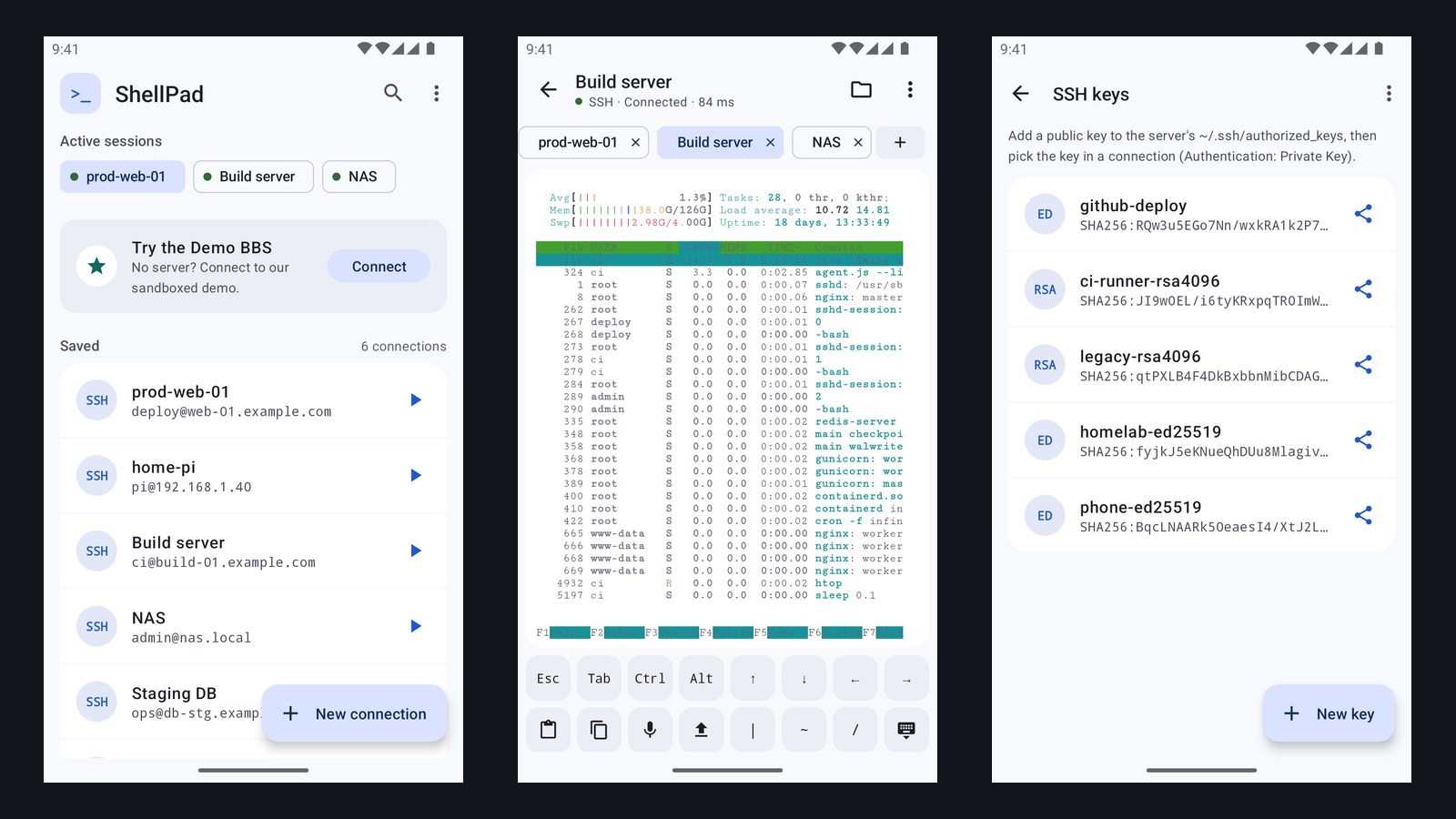
Version 1.2 can generate Ed25519 or RSA 4096 key pairs on the phone and import existing keys, including passphrase-protected ones. The public half can be copied or shared so it can be added to a server's authorized_keys file, and each saved connection can be pointed at a stored key. Moving a phone from password logins to keys removes one of the most common weak points in remote administration: a reused password typed on a small screen.
Saved passwords and private keys are encrypted at rest with AES-256-GCM, using a key held in the Android Keystore through the platform's EncryptedSharedPreferences library. If the Keystore is not available, the app refuses to save the secret rather than falling back to plain text. Connections and keys stay on the device. There is no account, no sign-up and no cloud sync.
Port forwarding without exposing services
The new port-forwarding feature covers a common real-world need. Router admin pages, database consoles and internal dashboards often should not be reachable from the internet, but an administrator still needs to reach them from the road. ShellPad's local forwards bind to the phone's loopback address, 127.0.0.1, and carry traffic through the encrypted SSH session to a host behind the server. Forwards can be set to start automatically when a connection opens. The result is that a management interface can stay off the public internet entirely and still be usable from a phone browser.
The SFTP browser handles the other routine job: pulling a log file down or pushing a config file up, with progress and cancel, plus rename, delete and new-folder actions on the server. Snippets store commands that are typed often, and they can be inserted for editing or run directly.
The 1.2.1 hardening release
ShellPad renders its terminal with xterm.js inside an Android WebView. A WebView that is wired to native code is a known risk area; Android's developer documentation warns that content loaded into a WebView with a JavaScript interface can reach the app's native methods. Version 1.2.1 locks the terminal view to the app's own bundled page, so a link printed by a remote server can no longer load inside it. The same release requires a per-install token before a home-screen widget or shortcut can open a saved connection directly; a request from any other app gets a confirmation prompt instead. Passwords and key passphrases are also no longer kept in the app's saved UI state, and are reloaded from the encrypted database when needed. One trade-off is visible to users: tapping a URL in the terminal currently does nothing instead of opening a browser.
Telnet is still there, and still plain text
ShellPad keeps Telnet support for the switches, serial console servers and lab gear that still require it. Telnet, defined in RFC 854, has no encryption, so credentials and session contents cross the network in the clear. It belongs on isolated management networks or behind an SSH tunnel, not on shared Wi-Fi.
What It Means for Defenders
- Verify the first fingerprint. Check the fingerprint ShellPad shows against the server's own key before trusting it. ShellPad prints the SHA-256 hash as colon-separated hex rather than the base64 form OpenSSH uses; on the server,
awk '{print $2}' /etc/ssh/ssh_host_ed25519_key.pub | base64 -d | sha256sumgives the same hash in lowercase hex without the colons. A changed-key warning on a server you have not rebuilt should be treated as an incident. - Use a dedicated key for the phone. Generate a separate Ed25519 key on the device and add it to
authorized_keyson its own line, so it can be revoked on its own if the phone is lost. - Tunnel admin interfaces instead of exposing them. Local port forwarding lets router, NAS and database consoles stay bound to internal addresses.
- Keep Telnet on isolated networks. Where legacy gear requires it, reach that network through SSH first.
- Lock the phone itself. On-device encryption protects stored secrets at rest, but an unlocked phone with saved connections is still a path into every server on it.
ShellPad is free and ad-supported, with an optional one-time in-app purchase to remove ads, and it requires no account.
Sources
- ShellPad: SSH & Telnet Client on Google Play (DevPulseTools)
- RFC 4251: The Secure Shell (SSH) Protocol Architecture
- OpenBSD manual: ssh_config(5), StrictHostKeyChecking
- Android Developers: Insecure WebView native bridges
- Android Developers: EncryptedSharedPreferences
- RFC 854: Telnet Protocol Specification
