Remote support tools are built on a simple assumption: the technician is in charge, and the machine on the other end of the session follows instructions. A flaw in the ConnectWise ScreenConnect client breaks that assumption. Attackers are now using it to turn a support session around, so that the "customer" side runs code on the technician's workstation.
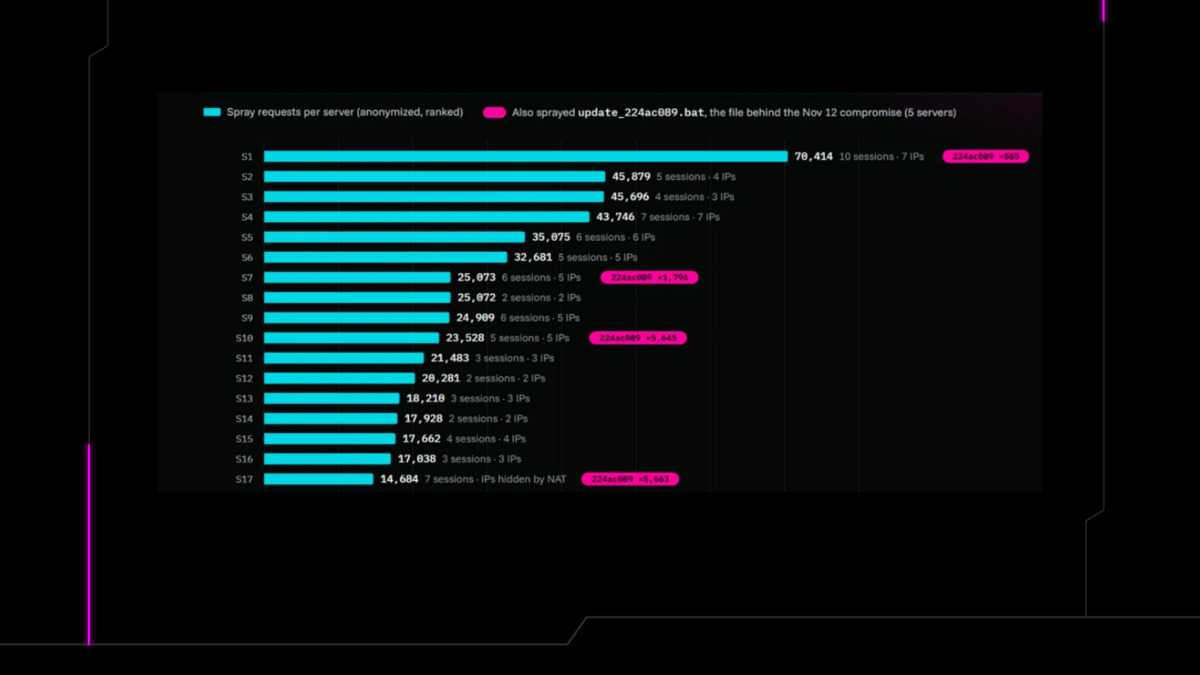
Security firm Huntress said on November 16 that it had confirmed in-the-wild exploitation of CVE-2026-84869. ConnectWise patched the bug on September 8 in ScreenConnect 26.6.5. Huntress tracked at least two technician machines that ran attacker-supplied files in November. At least four more were exposed in October. Across its customer base, the firm counted at least 688,000 malicious requests aimed at 42 managed service provider (MSP) servers.
A support session that runs backwards
ScreenConnect has two sides. The host is the technician who connects in to help. The guest is the machine being supported. In normal use, the host decides what happens during the session, including when files move from one side to the other.
ConnectWise's September 8 bulletin describes "a condition in the ScreenConnect client" that "may allow files to be transferred and executed through an active remote session without authorization or Host confirmation in certain circumstances." The CVE record, which ConnectWise published as the CVE Numbering Authority, has a more direct title: ScreenConnect Client: Guest-to-Host File Execution via File-Transfer Actions.
ConnectWise classifies the bug as CWE-862 (Missing Authorization) and CWE-269 (Improper Privilege Management). In plain terms, the client does not check whether the guest is allowed to start a file action. A guest machine under an attacker's control can therefore place a file on the technician's PC and run it, with no approval prompt for the technician.
The CVSS 3.1 score is 9.9 out of 10. The vector string explains why it is so high:
- Network-reachable, low complexity: the attack works over an ordinary session and needs no special conditions.
- Low privileges required: the attacker only needs to be a participant in a session, which a guest is.
- No user interaction: according to the score, the technician does not have to click anything. Huntress notes they only have to join the session.
- Scope changed: the damage reaches beyond the vulnerable component, from the guest's session into the technician's own machine.
- High impact on confidentiality, integrity and availability.
ConnectWise says ScreenConnect servers are not affected. The flaw is in the client software, and every client version before 26.6.5 is vulnerable. The vendor rates the bulletin severity "Important" with priority 1 (High).
What Huntress saw
The Huntress write-up shows how quickly a successful hit plays out. On November 12, a technician workstation at one MSP ran a batch file that a guest had pushed through the vulnerable client. The script reported back to a Telegram bot, downloaded an installer, and started a rogue ScreenConnect client. Huntress says the whole sequence took about nine seconds. That rogue client gave the attacker their own remote-access channel into the technician's PC.
On November 13, a second technician ran an attacker "canary" file. A canary is a harmless marker file that attackers use to check whether a target is exploitable before sending a real payload.
Huntress found that the activity had started earlier. At least four more technicians were exposed in October. One of those cases involved a path-traversal attempt, where a crafted file path tries to write outside its intended folder. In this case the goal was to drop a file named Sync.bat into the Windows Startup folder so that it would run at the next login.
The scale is the most notable part. Since October 20, Huntress counted at least 688,000 guest "run file" requests for batch files matching the pattern update*.bat. They hit 42 MSP servers and came from 29 IP addresses. Huntress describes this as attackers spraying servers blindly and waiting for any technician to join, rather than picking targets by hand.
The Hacker News reported on November 23 that the activity ran from October 20 to November 16. It also separated the campaign from two other recent ScreenConnect threats:
- The SCKit wave, which abused an authentication flaw in a third-party extension rather than the client itself.
- A cluster of fake guest sessions with crypto-flavored names such as BITMEX-BOT, KUCOIN-SRV and LAPTOP-BINANCE. A scripted emulator registered them, and no follow-on malicious activity was observed.
Defenders who see any of these in their logs should keep in mind that they are separate problems with separate fixes.
None of the sources tie the CVE-2026-84869 activity to a named group or nation-state, and we will not guess.
Why MSP technicians are the prize
An MSP technician's workstation is one of the most valuable machines in its environment. Huntress says it typically holds RMM consoles, saved credentials, and access to every customer. This bug lets an attacker work through one of the few channels a technician is expected to trust: a session they opened themselves.
The patch shipped more than two months before Huntress confirmed exploitation. Huntress says that in the cases it examined, many technicians were still on 22.x, 24.2 and 25.8 clients weeks after the fix shipped. Updating the server does not fix this bug. The vulnerable code runs on each technician's own machine.
What It Means for Defenders
Who is affected: any organization whose staff use a ScreenConnect host client older than 26.6.5. That especially includes MSPs and internal IT teams that run frequent support sessions. ConnectWise says servers are not affected.
Patch: update every technician's ScreenConnect host client to version 26.6.5 or later, the fixed release ConnectWise shipped on September 8, 2026. Huntress stresses that this applies to every technician machine, and ConnectWise also says to reinstall host clients and update access agents after upgrading. If you cannot patch immediately, both vendors advise removing the TransferFiles permission from roles and session groups as a temporary mitigation, not a substitute for the update.
Hunt: Huntress recommends looking for the ScreenConnect client starting scripts from Temp directories. Based on the activity described above, also check for:
- Unexpected batch files on technician machines, especially names matching
update*.bat. - A
Sync.bator other unfamiliar script in user Startup folders. - Outbound connections to Telegram from technician workstations.
- A second, unrecognized ScreenConnect client installed or running alongside the legitimate one.
- Large volumes of guest-initiated file-run requests in your ScreenConnect server logs.
If you find a hit: treat the technician's workstation as compromised. The November 12 chain installed a rogue remote-access client within seconds, so assume the attacker may have had interactive access. Isolate the machine. Remove any unauthorized remote-access software. Then review what that technician could reach, because a technician's stored access may lead into client networks. Huntress advises rotating every credential reachable from that workstation, including RMM, PSA, ScreenConnect, password vault and customer admin accounts.
Keep the threats separate: patching this client bug does not address the SCKit extension issue that The Hacker News describes. Review your installed third-party extensions on their own.
Sources
- ConnectWise: 2026-09-08 ScreenConnect Bulletin (26.6.5)
- CVE Program: CVE-2026-84869 record (CVE Services API, JSON)
- Huntress: CVE-2026-84869 in ScreenConnect Exploited to Run Malicious Files on MSP Technician Accounts
- The Hacker News: Hackers Exploit Critical ScreenConnect Flaw to Hijack MSP Technician PCs Without Warning